Have you ever opened a study PDF and realized after a few minutes that the content is too long to finish in one sitting, while your time is already limited? A student often handles lecture notes, research papers, and subject material together, and because of that, the total amount of information keeps increasing every day.
The issue is not only about understanding topics. The real difficulty appears when the amount of content grows faster than the time available to process it. Manual note-making takes effort, and while you try to keep up, the backlog continues to grow. This creates a situation where reading and note-making both start competing for time.
Many students begin with proper focus, but after some time, sections get skipped just to move ahead. This creates gaps that become visible during revision. Exam time makes this problem more clear because the content remains unfinished while time runs out.
Common situations include:
- Reaching exams with incomplete preparation
- Losing track after reading a few pages
- Spending too much time on note making
- Skipping sections and facing confusion later
Top 10 Note Summarizer Tools for Long Study Material and PDFs
Have you searched for summarizer tools and felt confused because many options look similar but behave differently when handling long documents? The difference becomes clear when you use them with real study material.
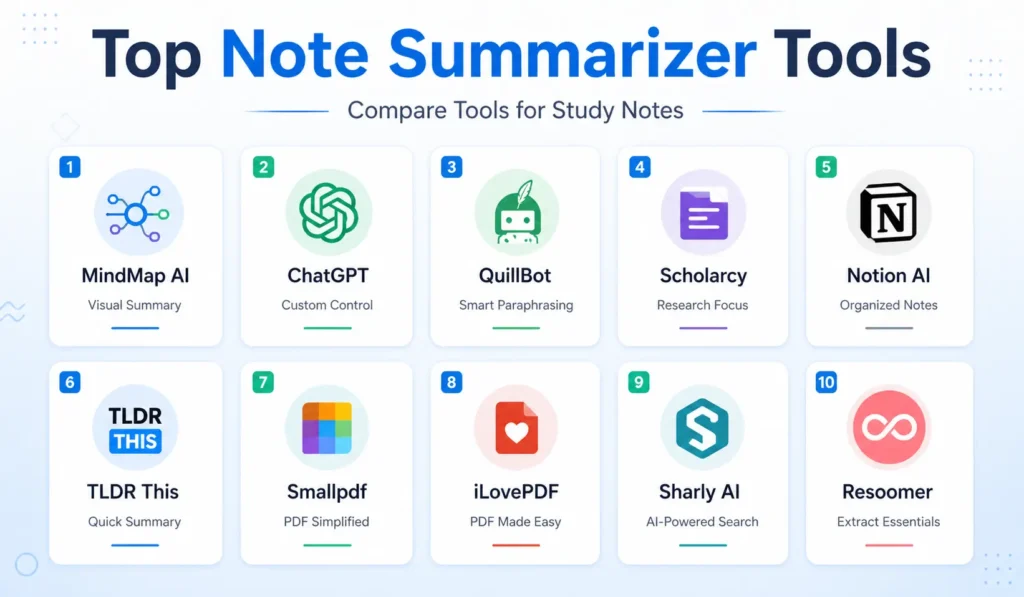
Many tools look similar at first, but they behave differently when handling long documents. The difference appears when you use them with real study material.
1. ChatGPT
This tool allows controlled summarizing through instructions. Content can be processed section by section, which helps maintain accuracy.
Large documents need to be split manually. Processing in parts gives better results than uploading everything at once.
2. QuillBot Summarizer
This tool offers different summary modes and allows adjustment of output length. It works well for medium sized content.
Large files still need to be divided into smaller parts. Clean input text improves output quality.
3. MindMap AI Note Summarizer
This MindMap AI Note Summarizer converts PDFs into structured mind maps and organizes ideas into connected sections instead of plain text. The output shows relationships between topics, which helps during revision.
The structure can be edited and exported into formats like PDF and image. This makes it easier to review complex subjects where connections matter.
4. Scholarcy
This tool extracts highlights and important sections from academic content. It works well with research papers and structured material.
The output focuses on key points, which helps during research work.
5. Notion AI
This tool works inside notes and summarizes existing content without switching platforms. It fits well in ongoing study workflows.
Keeping notes and summaries in one place reduces effort during revision.
6. TLDR This
This tool generates quick summaries for fast reading. It works well when speed matters. Control over detail is limited, so it is less useful for deep revision.
7. Smallpdf AI Summarizer
This tool by SmallPDF accepts direct PDF uploads and generates summaries for structured documents.
Files with complex layouts, like tables, can affect output quality.
8. iLovePDF AI Summarizer
This tool combines document handling and summarizing in one place. It works well when files are clean and properly formatted.
Using one platform for multiple tasks reduces time spent switching tools.
9. Sharly AI
This tool supports PDF, Word, and article content. It generates structured summaries across formats.
Controlled input improves results when dealing with large amounts of content.
How to Use a Note Summarizer Properly
Uploading a full document at once often gives incomplete summaries. Dividing content into smaller sections improves accuracy.
Formatting issues like broken lines and extra spaces affect how tools read content. Cleaning the text improves output.
Combining summaries after processing sections separately helps maintain flow and context.
Workflow:
- Break the document into smaller sections
- Clean formatting before summarizing
- Process sections one by one
- Combine summaries manually
Sometimes text is not the only format you work with. If you also deal with visual content, this guide on Best Face Swap AI and Lip Sync Tools shows how content can be transformed beyond written summaries.
Conclusion
The main challenge is managing large amounts of content within a limited time. A summarizer reduces effort, but the result depends on how the tool is used and how the input is prepared.
Different tools perform better for different types of material. Matching the tool with your study style improves results.
Better output comes from splitting content, preparing input, and reviewing summaries instead of relying only on automation.
What a Good Note Summarizer Must Handle
A summarizer can reduce content size, but if important points are removed, the output loses value during revision. A proper tool should handle long documents without breaking structure, because once headings and flow are disturbed, the summary becomes difficult to follow.
Study material comes in different formats such as PDFs, Word files, and plain text notes. A summarizer should support all of these formats and produce consistent output across them. If the tool works only for one format, then the workflow becomes fragmented.
Accuracy becomes more important than speed when the content includes definitions, formulas, or key explanations. Removing these details makes the summary less useful. Scanned PDFs add another layer of difficulty because the content is not directly readable and requires text extraction before summarizing.
If the same study material also needs to be sent to classmates or a team, you can use a PDF hosting site to upload the original document and share it through a link instead of repeatedly sending the file itself.
A good summarizer should:
- Process long documents without cutting key sections
- Maintain headings and logical flow
- Support multiple file formats
- Provide control over summary length and detail
How to Use a Note Summarizer Properly
A full document upload often leads to incomplete summaries. Breaking content into smaller sections allows better processing and improves accuracy.
Formatting issues, such as broken lines and extra spaces, affect how tools read the content. Cleaning the text before summarizing improves the output.
Combining summaries after processing each section helps maintain flow and context across the document. This step ensures that the final output remains useful for revision.
Workflow:
- Break the document into smaller sections
- Clean formatting before summarizing
- Process sections one by one
- Combine summaries manually
FAQs
What is the best note summarizer for long PDFs?
Have you noticed that no single tool works perfectly for every document size? Tools like MindMap AI, ChatGPT, and Scholarcy are commonly used, but results depend on usage.
Can AI summarizers handle full books?
Have you tried uploading very large documents and seen incomplete output due to size limits? Large files need to be divided into smaller parts.
Are summarizers accurate for exams?
Have you relied on summaries and wondered if they covered all concepts? Accuracy depends on usage and review.
How to summarize scanned PDFs?
Have you tried summarizing scanned notes and faced issues because the text was not readable? OCR conversion is required before summarizing.


